
In many small offices, the most important login in the business is protected by one password and a phone that sits on the reception desk. The one-time code goes to the owner's number, someone forwards it on WhatsApp when a colleague needs to sign in, and nobody is quite sure who still knows the admin password from the website project three years ago.
Multifactor authentication (MFA), also called two-step verification (2SV) or two-factor authentication (2FA), fixes the biggest part of that risk: a stolen password on its own stops being enough. But switching it on carelessly can lock the owner out of the company email on the day a client is waiting. This is the rollout order I use with founder-led businesses, based on guidance from Google, Microsoft, the UK National Cyber Security Centre (NCSC) and the US Cybersecurity and Infrastructure Security Agency (CISA).
Direct Answer
Roll out MFA for a small business in this order: first the admin accounts for email and cloud files, then the domain registrar, DNS and hosting accounts, then money and payroll systems, then everyday staff accounts and the tools they use daily. Prefer an authenticator app, a passkey or a security key over text-message codes, give every account a recovery route that does not depend on one person's phone, and keep a written list of which method protects which account. Google recommends enforcing 2SV for administrators and for users who handle important business information, and Microsoft's free security defaults require every user to register for MFA.
Why a Password Alone Is No Longer Enough
CISA's explanation is simple: even if someone steals your password, they cannot complete the second step, so they still cannot get into the account. Passwords leak in ways a small business does not control: reuse on another site that gets breached, a convincing fake login page, a laptop with saved passwords, or a former contractor who never lost access.
The vendors who run most small business email say the same thing in their own documentation. Microsoft says that, based on its own experience, more than 99.9% of common identity-related attacks are stopped by using MFA and blocking legacy authentication. Google says 2SV can cut account takeover by as much as 50%. The figures differ because they measure different things, but the direction is the same, and the cost of the control is close to zero.
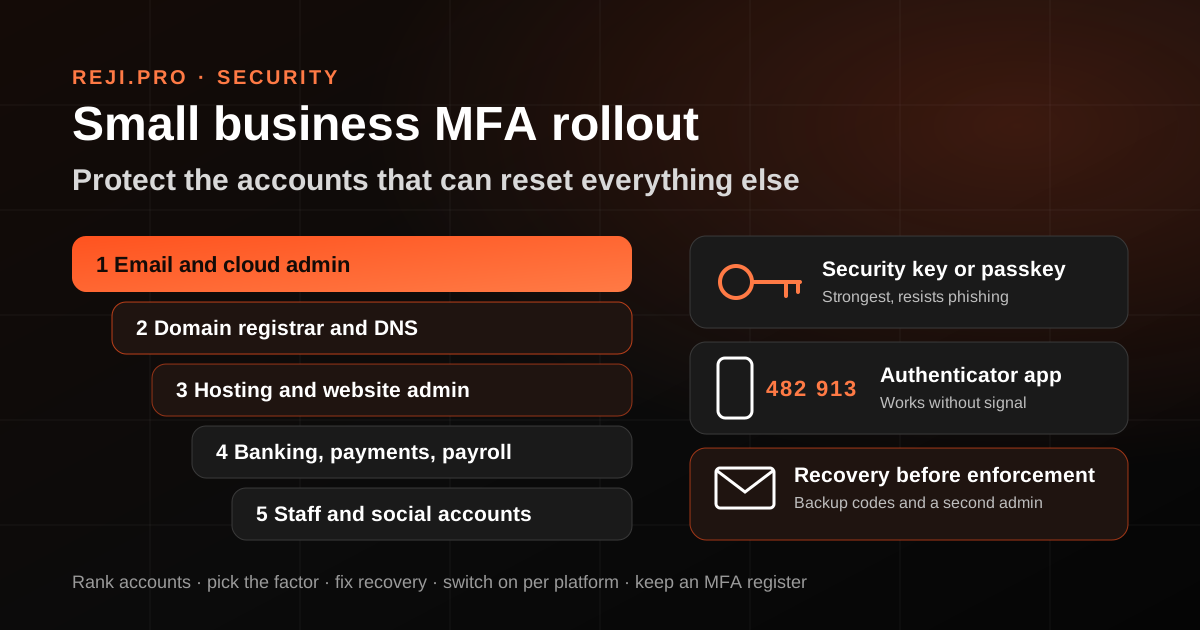
Step 1: Start With the Accounts That Can Change Everything Else
Not every account carries the same risk. Google's admin guidance puts it plainly: the administrator account is the most powerful account because it can delete users, reset passwords and access all your data. Begin with the accounts where one takeover leads to every other takeover.
- Email and cloud admin: the Google Workspace super admin or the Microsoft 365 global admin. Whoever controls this can reset almost every other login that sends a reset link by email.
- Domain registrar and DNS: control here means control of your website, your email routing and the verification records for most other services.
- Hosting and website admin: the hosting panel, the CMS administrator account and any server or cloud console.
- Money: online banking, payment gateways, payroll and accounting software.
- Public voice: the business social media pages, the Google Business Profile and the WhatsApp Business account.
If you have not already listed who owns and can sign in to each of these, do that first. A rollout plan built on a guess about who controls the domain tends to fail at the worst moment.
Step 2: Choose the Second Factor Deliberately
Most services offer several methods, and they are not equal.
- Security keys and passkeys: Google describes security keys as the strongest 2SV method and says they protect against phishing threats. A phone can act as a built-in security key, and passkeys let people sign in with the screen lock they already use on a phone or computer.
- Authenticator apps: the NCSC points out that apps such as Google Authenticator and Microsoft Authenticator work without a mobile signal and without waiting for a text to arrive. Under Microsoft's security defaults, the Authenticator app asks users to type a number shown on the sign-in screen, which helps stop people approving a prompt they did not start.
- Text message or phone call codes: much better than nothing, and sometimes the only option a bank or registrar offers. They depend on a working SIM and signal, which matters for anyone who travels or switches SIMs often.
- Backup codes: single-use codes you print or store safely before you need them. The NCSC notes that each code works only once, so you will need to create more after you use them all.
A sensible default for a small team is an authenticator app or passkey for everyone, a hardware security key for the main admin account, and text codes only where a service offers nothing better.
Step 3: Fix Recovery Before You Enforce Anything
The most common MFA failure in small businesses is not a hacker. It is a lost or replaced phone, a staff member who leaves, or an owner travelling with a different SIM. Before you make MFA compulsory, answer these questions for each critical account:
- Who are the two people who can sign in or recover it? One person is a single point of failure.
- Where are the backup codes kept? A sealed envelope in the office safe or an encrypted business password manager both work. A screenshot in a chat thread does not.
- Does the recovery email address belong to the business? Recovery should not depend on a personal mailbox or a former employee's address. The NCSC notes that email can serve as a second step only when it is a different account from the one used to reset your password.
- Is there a second admin account? For Google Workspace and Microsoft 365, keep at least two named admin accounts, each with its own MFA, so one lockout does not end access.
Microsoft's guidance also recommends separate accounts for administration and everyday work, which means admins are prompted less often in daily use and the powerful account is exposed less.
Step 4: Switch It On Platform by Platform
On Microsoft 365, the free route for most small businesses is security defaults in Microsoft Entra ID. Microsoft says tenants created on or after 22 October 2019 may already have security defaults enabled. When enabled, the policy requires all users to register for MFA, requires administrators to complete MFA when they sign in and blocks legacy authentication protocols. Microsoft removed the old 14-day registration grace period from 29 July 2024, so plan for staff to register on their first sign-in after you enable the setting. If you pay for Microsoft Entra ID P1 or P2, Microsoft suggests Conditional Access instead of security defaults.
On Google Workspace, an admin can make 2SV optional or required, and Google recommends enforcing it for the administrator account and for people who work with sensitive information such as financial records and employee data. Give staff time to enrol before enforcement, and check that the admin account itself is enrolled first.
For the registrar, hosting panel, bank and social accounts, there is usually no central switch. Each one needs to be turned on separately, by the person who holds that login, with the recovery details written down as you go.
Step 5: Remove the Shared OTP Habit
Many small businesses share one login for a supplier portal or a social media account, with the code going to one phone. Every sign-in means messaging the owner for the code. It feels workable, but it trains everyone to pass codes around in chat, which is exactly the behaviour a scammer will try to exploit.
Where a service supports it, give each person their own named login with their own second factor. Where it does not, store the shared account's credentials and authenticator in a business password manager with access limited to named people, and write down who has access. When someone leaves, change that password and reset the second factor the same day.
Step 6: Keep a One-Page MFA Register
One table, reviewed every quarter, is what makes this survive staff changes:
- Account and its purpose
- Owner and backup person
- Second-factor method (security key, passkey, app or SMS)
- Where the backup codes are stored
- Recovery email and phone, confirmed to belong to the business
- Date last checked
A quarterly check takes about half an hour for a small team. Sign in to each critical account, confirm the method and recovery details still match the register, and remove anyone who no longer needs access.
Notes for Businesses Across the Gulf and India
Two practical issues come up often for teams split between the Gulf and India. First, travel: an owner who moves between countries may not receive text codes on a home number while abroad, so an authenticator app, passkey or security key is far more reliable than SMS for the accounts that matter. Second, family and partner access: many businesses here are run with a spouse, sibling or long-time partner who needs emergency access. That is a good backup arrangement, as long as it is a named second admin account rather than a shared password.
How Reji.pro Can Help
MFA is one of the controls I check first in a digital transformation review, together with domain ownership, email authentication and backups, because without it the rest is fragile. If you want help mapping your accounts and setting up recovery that does not depend on one phone, start with the ownership audit linked on this page or get in touch through the contact page.
Sources
Google Workspace Admin Help, Protect your business with 2-Step Verification: knowledge.workspace.google.com/admin/security/protect-your-business-with-2-step-verification
Microsoft Learn, Configure security defaults for Microsoft Entra ID: learn.microsoft.com/entra/fundamentals/security-defaults
NCSC, Setting up 2-Step Verification (2SV): ncsc.gov.uk/guidance/setting-2-step-verification-2sv
CISA, Secure Our World, Turn On MFA: cisa.gov/secure-our-world/turn-mfa
Frequently Asked Questions
Is SMS two-factor authentication good enough for a small business?
It is much better than a password alone, and for some banks or registrars it is the only option. For admin, email and domain accounts, prefer an authenticator app, a passkey or a security key, which do not depend on a mobile signal or a SIM card.
What happens if the owner loses the phone used for MFA?
That is why recovery comes before enforcement. Keep printed or securely stored backup codes, a second admin account with its own MFA, and recovery details that belong to the business. With those in place, a lost phone is an inconvenience rather than a lockout.
Global Malayali digital transformation consultant and mentor with 25+ years across web technology, SaaS, hosting, automation, infrastructure, and customer operations. Founder of Hostao, AutoChat, RatingE, and BestEmail.
Have one business workflow that needs to improve?
Describe the customer, operations, or team-workflow problem first. The next step may be diagnosis, mentorship, a focused implementation scope, or another specialist.